GBTC: Publish your app with easeDiscover GoodBarber Takes Care and simplify the app publication process for both the App Store and Google Play. Let us handle the technical details for you.Learn more about GBTC
It is now possible to send notifications via SMS with GoodBarber. SMS notifications is a new add-on in the catalogue. Once installed, you can notify the users of your Progressive Web App via SMS.
How it works
From the add-ons store, available in your back office (Add-ons > Catalogue), add SMS Notifications to your app. It is free to install.
Once the add-on is installed, a new menu will be available in the Users section of your back office. This is the SMS Notifications menu.
The SMS Notifications menu allows you to personalize and send texts, and to see the history of sent messages.
When a user looks at the PWA for the first time, a pop-up will appear that will ask him if he wishes to receive text notifications. If he refuses, a cookie will store this information and he won't be asked again. If he accepts, he will enter his phone number and validate. He will immediately receive a welcome text.
A user can remove his number from the list of text message recipients at any time. All he has to do is reply STOP to the last message you sent him. If he replies START to one of your messages, he will be re-subscribed.
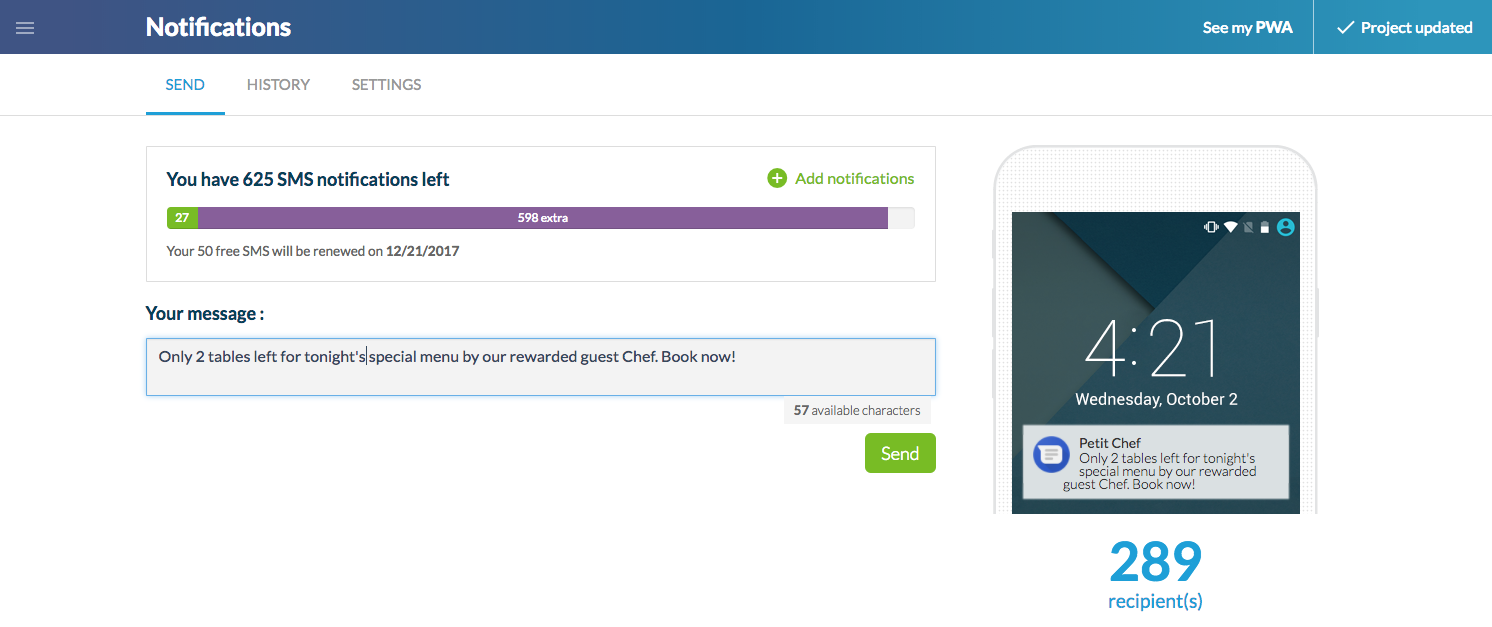
From the page Users > Push > SMS Notifications, you will be able to write and send your message. The page will indicate the number of recipients. The size of a text is limited to 140 characters, so that only 1 single text will be sent to each recipient.
Cost
Installing the SMS Notifications add-on is free. Additionally, you'll get 50 free SMS's when you install the add-on. This 50 free SMS quota is renewed each month on your subscription's renewal date.
On the SMS sending page, you'll see a bar which indicates the number of texts left on your account. You can also purchase additional texts here, at the price of $0.07/SMS.
Advantages
Whatever device the user may be using (iPhone, Android, tablet, computer), he has the option to subscribe for text notifications, no matter which browser he is using. Once signed up, the messages will be received on his mobile phone. This works on all mobile phone models, in all 221 countries! It's a good alternative to web push notifications for reaching users, differentiated by its level of robustness and the way in which it can be universally distributed.
On your side, setting it up is very simple. You just have to add the add-on to your app, and that's it. Immediately after, your users can sign up to receive SMS notifications. Those who have already gone through the tedious process of setting up push notifications will appreciate the difference ;)
Advice
Not all notifications are seen the same way by users. SMS notifications allow you to strongly capture your user's attention as soon as they're received.
In your user base engagement strategy, are you going to use SMS notifications the same way you use push notifications?
MB WAY, Scalapay and seQura join Stripe Extended: mobile payment for Portugal and pay-in-installments options, ready to enable in your GoodBarber eCommerce app.
It all starts with the design. A new typeface, Plus Jakarta Sans, a blue for the interface, a green kept for publishing and confirming, softer corners, gentle shadows and redrawn icons. The whole thing reads calmly, and every color has a job: blue guides, green confirms.In My App, your app's preview takes the center of the screen and the settings sit together in a panel on the right. You edit on one side, you see the result on the other, and your app stays in front of you the whole time.
 eCommerce
 Memberships
 Chatbot
 Online Courses
 Bookings
 Travel guide
 Events
 Content Creators
 Pickup & Delivery
 Newspaper
 Radio
Radio Schools
 Faith
Faith Organizations
 Restaurant
 Grocery
 Custom apps
 Employee Communication

 NO CODE APP BUILDER
 TECHNOLOGY
 WHY GOODBARBER?
 Design
 PRODUCT RESOURCES
 TOPICS
 MOBILE APPS RESELLERS
 DISCOVER