GBTC: Publish your app with easeDiscover GoodBarber Takes Care and simplify the app publication process for both the App Store and Google Play. Let us handle the technical details for you.Learn more about GBTC
Many sectors of activity have been affected by the health crisis, and tourism has not been spared. Nevertheless, the market is trying to revive its activity little by little: The offer is adapting more and more to the novelties in order to meet high demand, especially by turning to new technologies, which have nowadays a determining place in the tourism field. The sector is modernizing and 89% of travelers plan their trips through digital means according to a study. That's why creating a tourism app is an ideal solution to promote your business and boost your activity.
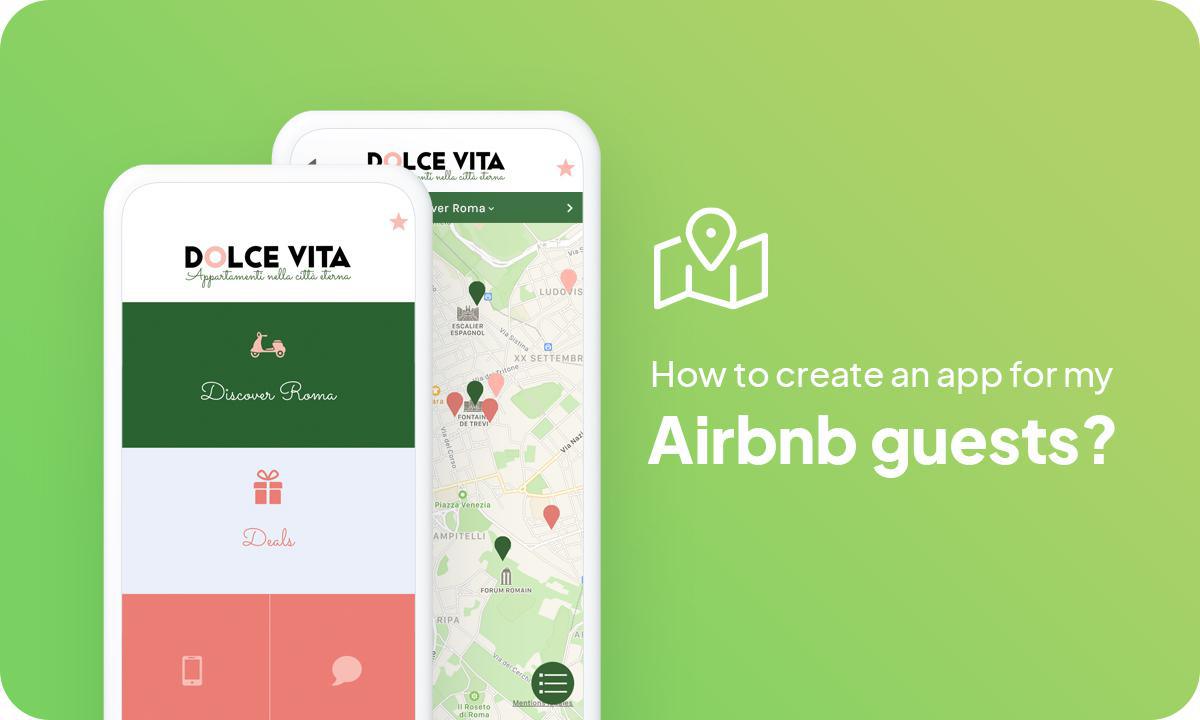
Why create an app for my AirBnB guests?
As a host for your Airbnb rental, you are probably often confronted with various requests from your clients, concerning for example off-the-beaten-path activities, must-see visits, or even good addresses in your host city and its surroundings.
As a local, you know your heritage and its treasures inside out and are probably in the best position to advise visitors about their stay. Travelers are more and more eager to get advice from locals and want to avoid tourist traps at all costs, that's why creating an app for your Air BnB guests is the perfect solution. Visitors are looking for authenticity when they travel and will trust your advice, offering content is a great way to stand out among the many hosts and tourist businesses, and increase loyalty.
An app also brings a practical aspect. Indeed, visitors also need to be able to contact you easily and interact with you, so it's a great idea. It is a way to reassure travelers on the one hand because they will be able to contact you before and during their stay for different requests, and on the other hand to accompany them throughout their trip and improve their vacations considerably. On top of that, the app is an ideal solution to share your Good Behavior Policy and to give the necessary information about life in your home (internet access, how to use the household appliances, garbage collection system...)
Creating an app is a real time saver for both travelers and the host. With this solution, you will no longer need to explain every detail since all the necessary information will be centralized on your app. More and more hosts are choosing autonomous ways to welcome guests, you can for example put a QR code in the accommodation to send travelers to your application, this is a method democratized since the health crisis. Say goodbye to paper guides in your apartments and opt for a more complete and practical digital solution.
If you are a novice and have never created an app before, we share our best tips in our article on how to create an app, through some key steps, as well as other best practices on our blog.
Follow these 5 steps to create an app for your Airbnb rental:
Choose a Design for your Airbnb host app
Structure the navigation of your vacation rental app
Organize the sections of your app for Airbnb guests
Introduce your different accommodations and prepare to welcome travelers
Test and publish your accommodation app
1. Choose a Design for your Airbnb host app
When you start creating your Airbnb accommodation app, it is automatically assigned a template and theme with colors and typography, but you have the option to choose from over 25 different themes created by our designers, in the back office of your app. You can choose the theme that best fits your brand identity, or modify the theme of your choice by creating your own color scheme. The Dolce Vita app uses the Pink Ladies theme, which has a warm and round calligraphic script that fits the app, but the color palette has been modified to create a unique theme that best reflects the app's universe. You can also create your own fully customized theme!
Also, think about the launch screen of your Airbnb app, it's the first thing users will see when opening your app (before the Home), not to mention the icon of your app that will be displayed on the home screen of the users' smartphone!
2. Structure the navigation of your vacation rental app
The navigation of your app must be easy and optimal: the creation of the Home of your app is a fundamental step: It must be both aesthetic and functional because it is the first screen in interaction with users.
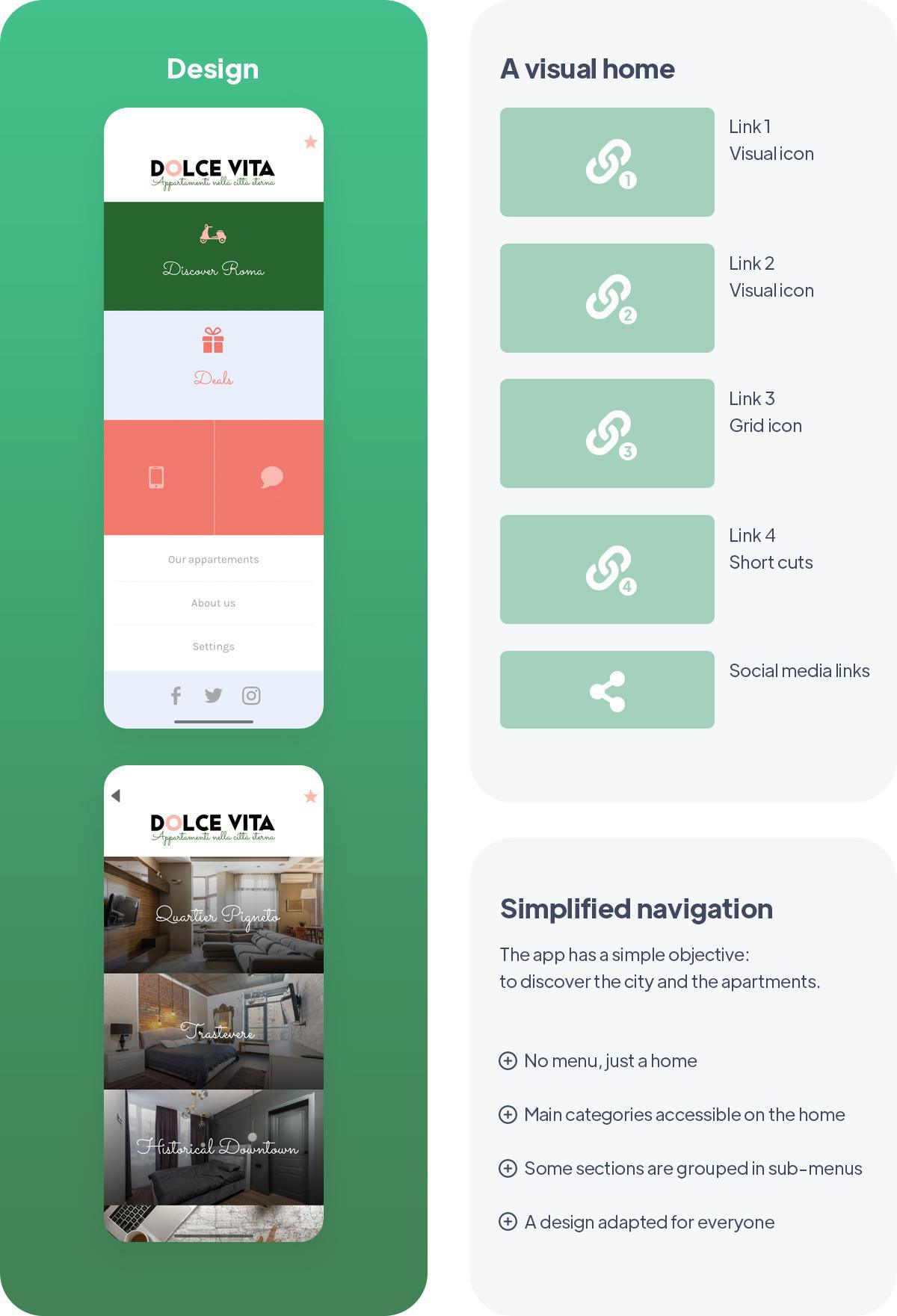
GoodBarber allows you to choose the content you want to put forward at the opening of your app. You can add several types of Widgets so that the Home reflects the identity and the objectives of the app. The Dolce Vita Home, for example, is meant to be simple: It acts as a Navigation Menu and must be as simple as possible in order to direct the user to what he is looking for, without forgetting the app's graphic charter and signature colors. The only Widgets used are Links, referring to the main sections of the app. Other types of apps will have a more extensive Home, with Widgets highlighting more content (Articles, Videos, or Podcasts), to give a more detailed overview of the app.
*The content that initially appears in the application is given as an example. You can modify and adjust it as you fill your sections with yours.
The Menu is used for secondary navigation of your app. The Home screen already provides entry points to the sections of your choice, so you can even choose not to display a Menu, as is the case with the Dolce Vita app, where the Home acts as the Main Menu. For a vacation rental app, the navigation menu must be intuitive and simple, so that users can easily find the information they are looking for, which is why we have chosen to confuse the menu and the Home in this app. If you decide to add a Menu, you can choose between 7 different types of menus. The TabBar template or the Little Swipe template can be perfectly suitable for a tourism app: These are templates that work well with apps that don't have many sections. They are permanently visible and make it easy to find the information you are looking for, that's why they are ideal for a tourism app
3. Organize the sections of your app for Airbnb guests
This is the most important step! Start by organizing the sections of your app dedicated to content. There can be a section for tips, another for tours, or even for gastronomy. Also think about the formats, Articles, Maps, Image Gallery, Deals, Videos, and many extensions for the content of your app that are available in our Extension Store . Once the structure is established, it's time to start adding content directly from the back office of your GoodBarber app. If you choose to import content from external sources you simply need to use one of our connectors and configure the section settings when creating it - and if you need a hand, you can refer the detailed online help or contact support. Your app is starting to take shape and will be ready soon!
4. Introduce your different accommodations and prepare to welcome travelers
Once the design and content addition steps are completed, it is now time to make some final adjustments. Whether you are a private individual who wants to rent out your accommodation, or a concierge company that wants to offer an app to promote its various available rentals: You must present your accommodations with as much detail as possible! Your app must facilitate the arrival of your Airbnb guests, but also your work as a host, which is why the presentation of your rentals must be complete: geographical position, arrival and departure times, formalities, and logistics, nothing should be forgotten! Each guest has specific needs, a family will need to know if the rental has several rooms, or a washing machine, while a group of young friends will only be interested in the wifi! Don't forget any detail and illustrate the presentation of the accommodation with photos so that travelers can project themselves in your apartments.
5. Test and publish your accommodation app
Your travel app for travelers is now ready! Before you share it with the world, you need to run a series of tests to make sure everything works as expected. You'll need to test all versions of the app you plan to release (native iOS, native Android, PWA, etc), using different operating systems and different browsers.
GoodBarber provides you with a test app that you can use to perform preliminary checks on your app. However, the best way to test your app, is to test it through its AdHoc version, which is the actual app file that will be submitted to the Stores that you can download and run on your device. Other options are available: For native iOS applications, there is a specific tool provided by Apple: TestFlight. It allows you to test your application before it is uploaded to the App Store. Android also offers alternatives.
Once you are satisfied with the results of your tests, you can move on to the next step: publishing your app! Publishing an app can be a complex process, starting with the mandatory step of registering as a developer on both Android and iOS platforms. The Apple developer account costs $99 per year. The Google publisher account costs $25 as a one-time fee. Keep in mind that Apple requires that the owner of the app content matches the owner of the developer account. Therefore, if you publish multiple iOS apps for different projects, each one will need its own developer account.
The process of submitting an app to the App Store is slightly complex and requires careful preparation. Apple reviews each app before approving it for release. Before submitting your app for Apple's review, you will need to provide a set of information (Icon, app preview/screenshots) and metadata (your app's name, category, detailed description, and additional keywords for ASO). The review process may take a few days, Apple will notify you via email when your app is published.
For Google Play, after creating your app on your Google Play Console, you will need to register the information that will be displayed on Google Play. This is mandatory information such as title, short description, full description, graphic assets (images, screenshots of the app), category, contact information, and privacy policy. Once the store listing is complete, it's time to download your app pack. (It contains all the elements of your app). Then follow the Google Console guide to deploy and publish your app. If your app is approved, it will be published in a few hours. Fortunately, publishing a Progressive Web App is much easier. Hosting is included in your GoodBarber subscription. However, we strongly recommend that you purchase and set up your own domain name. This will help your travel guide gain visibility and brand awareness. Plus, readers will be able to find you easily!
Now that you know everything, let's take a look at the creation of a tourism app dedicated to Air BnB travelers through the example of Dolce Vita: An app to visit the city of Rome!
The design of an app, a key step
The aesthetics and design of your application are of paramount importance, this is what will allow you to stand out thanks to a recognizable graphic charter, but also allow you to optimize the user experience. Indeed, an app with an attractive and well-thought-out visual has more chance to generate traffic.
Create an app with the colors of the location or country:
If you don't know where to start when it comes to app design, this is an interesting idea! What visitors like most of all is to feel a change of scenery, and find a little local touch in everything around them, every reminder is welcome. Use colors that you like, colors that remind you of your country, your city, or your accommodation is a great idea because it allows the visitor to project themselves into their trip.
If you are a host in a winter or mountainous region, with frozen landscapes, for example, opt for an application in cold tones, like a soft pastel blue. If you live in a region that evokes sun and beach, choose warm colors that remind you of summer. You can also take inspiration from the flag of your country, region, or city and create a theme around it. The Dolce Vita app reclaims the colors of the Italian flag, Red, White, and Green, with softer shades of pink and salmon rather than bright red. Other emblematic elements of Italy have been integrated into the application, such as the unmistakable Vespa, which appears as an icon in the Discover Roma section.
Customize the Design of Your app:
Your app should be one of a kind, so it's important to add your personal touches. This is a step that should not be neglected! Customize the design to create an app that suits you, in accordance with your brand image, and your personality.
Add visual content to your app: your app must be illustrated. Add photos or videos, it's what catches the eye, brings an aesthetic touch, and allows the user to visualize a place. Photos bring details and information but are also good decoration elements for your app. The Dolce Vita app contains several types of photos: Photos of the rentals so that the user can see what the accommodation looks like and choose the right apartment. Photos of places, sites of visits, monuments, and landscapes, as well as photos of typical dishes, which are immersive, give the desire to visit the city and enhance the app. There is also a photo of the hosts, to humanize the app. This brings a friendly and warm side that will arouse the sympathy of travelers.
Take care of your interface! The architecture of your app and the way it is arranged have a crucial role on the user experience. Adjust the size of your Header by choosing among the 3 sizes proposed by our tool. The Dolce Vita application has a medium-size header, but you can also propose a large header, and choose a disappearing or resizing effect when scrolling. You can also add your Logo, to bring an extra personal and professional touch.
Don't neglect the details, nothing should be left to chance! Think about attracting the eye, but also optimize the use. Add icons to your app for more clarity, and think about working on the design of each section.
Simplified navigation for an intuitive app:
The objective of this app is simple: to make people discover the city of Rome and to promote the apartments offered by the host to travelers. It must therefore be easy to understand and use. The content must be essential, the objective being to eliminate superfluous elements that could slow down the navigation of the users. The user experience must be optimal, hence the importance of a simplified and intuitive navigation.
The app does not have a navigation menu so that travelers can access information with a minimum of clicks. Instead, the homepage of the app acts like a menu, so that they see the different sections as soon as they open the app, and immediately understand its purpose. Only 4 main actions are highlighted:Discover Rome, the most important section, the Deals section, to add value to the app and highlight promotional offers, and finally, the two Contact Widgets, to direct travelers to the contact details of hosts. At the bottom of the page, there are 3 additional links, The Apartments, the About Section, which presents the hosts and their application, and the Settings. The homepage, therefore, brings together all the essential pages and makes it easy for visitors to find what they are looking for. Simple and unobstructed navigation guarantees user satisfaction.
Guide presentation
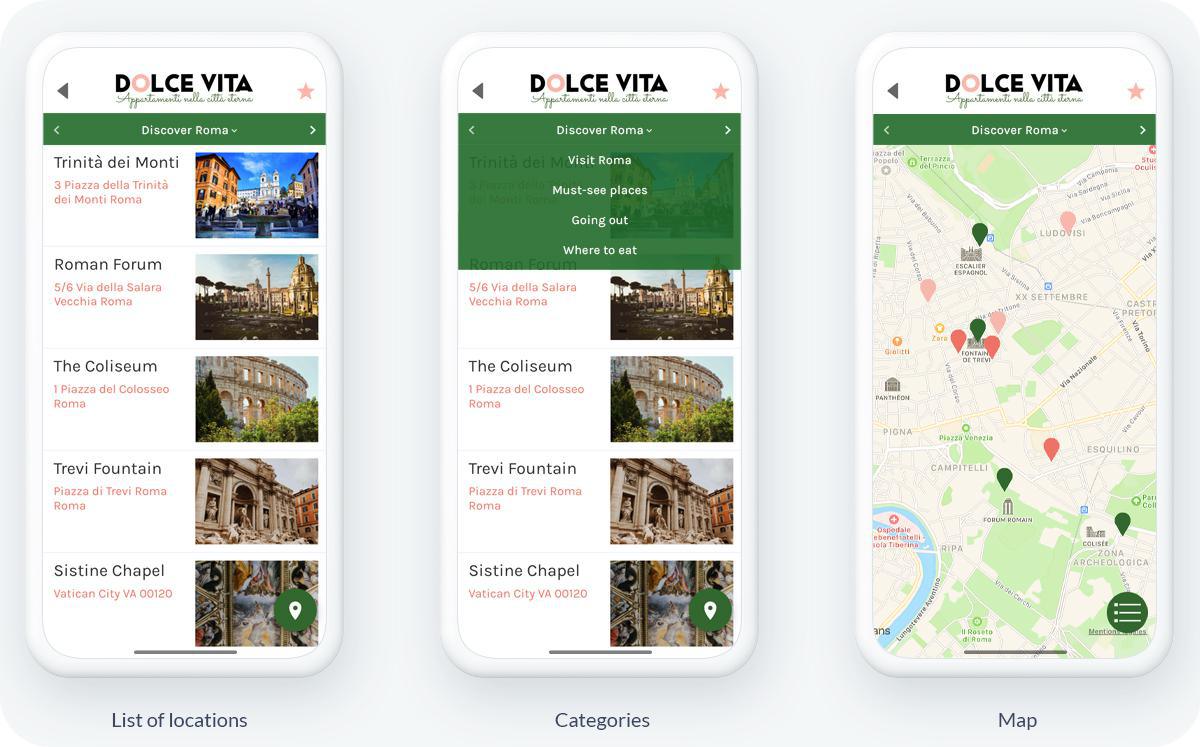
Your app allows you to present places to visit directly on a map so that travelers can get there without hindrance, and access a route from the call to action "see the route". Several views of the places are available:
Map view is a global view of points on the map. Users can view the map of the city or region of travel. The places you add to your app are represented on this map as icons and appear at their exact address, which you will have entered in the back office. The global view on the map allows users to visualize the location of their future visits and to organize their excursions more easily according to their positions.
Another visual is available for your places, the List View: Places are listed here one after the other, accompanied by a photo, as well as their exact address. The List view is a good way for visitors to choose their favorite visits, it allows them to visualize the place, and establish a program according to their interests and the purpose of their trip.
You have the ability to categorize these places so that your app users can find exactly the place they are looking for. In the Dolce Vita app, there are 4 categories: The "Must-See Places" category, which lists the must-see tours to do in Rome. The "Where to Eat" category, in which the host lists their favorite restaurants, and finally, the "Where to Go Out" category, where the host's recommendations for nightlife are listed.
GoodBarber offers different icons, which bring more clarity to the app and differentiate the types of places represented. For example, you can represent restaurants with a flag and must-see places with a pin. In the Dolce Vita app, for example, restaurants are represented in light pink, bars in salmon pink, and cultural activities in green. You also have the possibility to integrate your own custom icons into your app!
Features to make travelers' lives easier
Tools to communicate: GoodBarber offers features that allow your app users to contact you in a quick and easy way. With the Home widgets, you have the ability to add various links to direct the user to a section of your app, an external link, or an action, as in the case of Dolce Vita Home. The last two widgets allow the user of the app to contact the host, by phone or SMS. You can also add a Contact section, to refer the user to your social links or contact information. Communications features are a must for a successful tourism app.
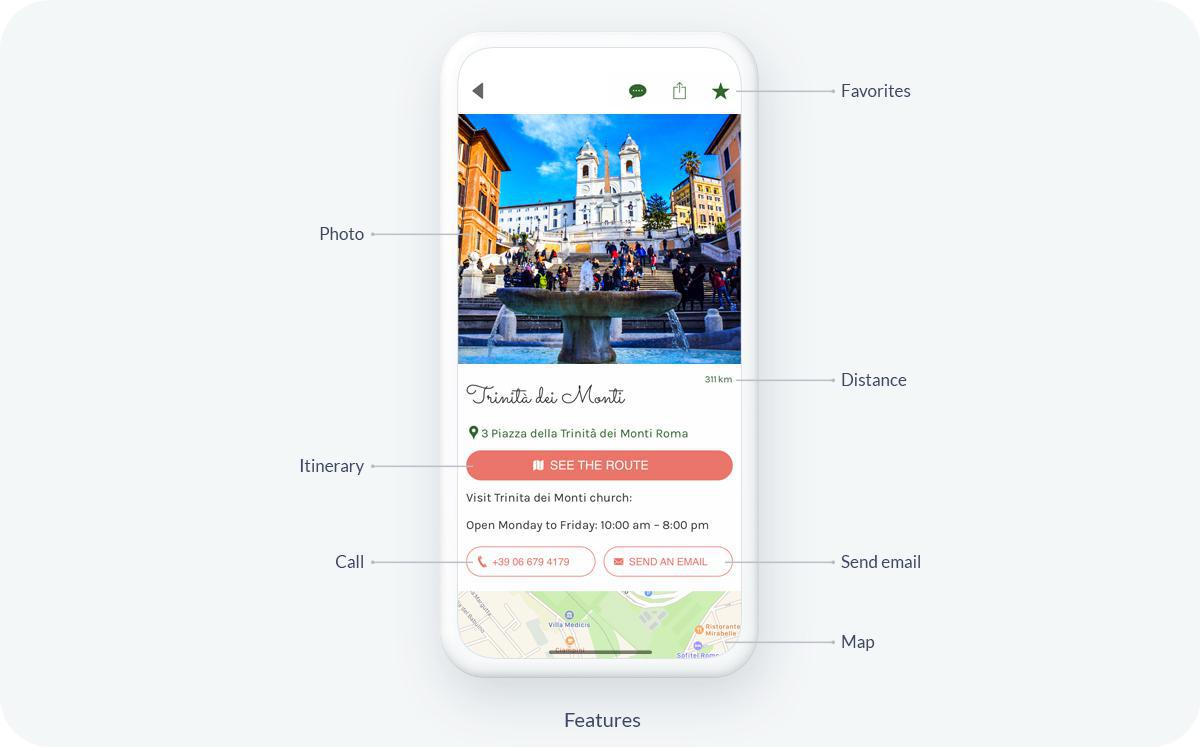
Options to get around easily: Thanks to the Map section, you have the possibility to create different geolocalized points on a map, and thus share the best addresses in your city: restaurants, cafes, must-see places, etc. You can make these points more interesting by adding text, images, videos, or call to actions buttons (link, phone, or email). The "view route" option allows you to redirect the user outside the app, to any location-based application. They will then have access to the route to take them to the address of the place they want to go to!
A Favorites Section to keep their favorite content: Adding a Favorites tab to your app allows users to save the items they want in a dedicated section. This way, when they find a piece of information that is important to them, such as an address or a good deal, for example, they can keep it aside so that they have it at hand when they need it. They can use your travel guide to create their own vacation checklist by saving all the places they want to visit in their favorites.
Always-on access to app content: Many travelers who go abroad don't have an internet connection outside of their accommodations and WiFi hotspots, yet they want their app to remain accessible at all times. GoodBarber makes your app usable in offline mode, so travelers can access the content of the app at any time, and can access the data they need: addresses, maps, opening hours, or promotional codes for example, without being connected to the internet. The offline mode is one of the essential features of a good tourism app!
Promotional offers to build renters' loyalty: By integrating a Couponing section to your app, you have the possibility to share all your best deals with your travelers. Offering your customers discounts through coupons, or promotional codes brings a real added value to your app and to your business. Promotional offers are an excellent way to stand out from the competition and attract new travelers, but above all to keep your visitors loyal thanks to this additional service. Negotiating discounts with the merchants and restaurateurs around you in exchange for their presence on your app is a huge advantage for you and your partners. It's a win/win solution that will delight your guests!
Conclusion
As a host, offering a tourism app allows you to offer your Airbnb travelers the best possible experience and to accompany them throughout their stay. An app is a real asset to differentiate yourself from the competition present in the tourism market. Increasingly attracted to advice from locals, visitors are looking to avoid tourist traps and want an authentic experience, so your content is a real goldmine. With our tool, you can create your tourism app without any technical skills required, so don't wait any longer!
The short version. Zeffy Events and Zeffy Campaigns are two extensions of GoodBarber, the no-code app builder, that read a nonprofit's campaigns on Zeffy. Zeffy Events fills a Calendar section with upcoming events, one entry per date when an event runs on several dates, each with a button that opens its Zeffy ticketing page in the app. Zeffy Campaigns fills an Article section with donation forms, peer-to-peer fundraisers and memberships: memberships open in the app, donations open in the phone's browser. You connect them with your Zeffy API key. Both are free for Content apps: each section counts as one of the extensions included in your plan.Zeffy says more than 100,000 nonprofits have raised over $2 billion through its platform, in an article published on June 16, 2026. Here is how the two extensions play out for a youth theater company that sells its show and raises funds on Zeffy.
In GoodBarber, each color of your theme plays a role. On one of our apps, changing a single color repainted 95 settings at once, without opening a screen.
The short version. Planning Center is an extension of GoodBarber, the no-code app builder, that fills a Calendar section with the events a church publishes on Church Center over the next six months. Recurring events appear once per date, at their public times, in the church's time zone, with their image, location and description. When an event has a sign-up, a button opens the form in the app. You connect it by signing in with a Planning Center Calendar administrator account: there is no key to copy. It is free for Content apps: each section counts as one of the extensions included in your plan.Many churches already run their calendar in Planning Center: it counts 78,000 active churches and 4 million active users, according to its About page, consulted in October 2026. Here is how the extension plays out for a church with a weekly service and a youth retreat.
 eCommerce
 Memberships
 Chatbot
 Online Courses
 Bookings
 Travel guide
 Events
 Content Creators
 Pickup & Delivery
 Newspaper
 Radio
Radio Schools
 Faith
Faith Organizations
 Restaurant
 Grocery
 Custom apps
 Employee Communication

 NO CODE APP BUILDER
 TECHNOLOGY
 WHY GOODBARBER?
 Design
 PRODUCT RESOURCES
 TOPICS
 MOBILE APPS RESELLERS
 DISCOVER